This month, I decided to revisit an oldie-but-goodie in the realm of hacking: overthewire’s bandit challenges. The bandit challenges are 35 distinct puzzles aimed at introducing absolute beginners to the domain of hacking. While many of these techniques are considered by professionals to be rudimentary, mastering and understanding them forms the foundation of any InfoSec career.
This post is a write-up of the first 10 challenges a user will encounter. Please note that this is meant to complement your own research and learning rather than as an answer key; if you are interested in learning about hacking, it would behoove you to try (and, in the words of Offensive-Security: “Try Harder!”) on your own before reviewing the write-up below.
Bandit Level 0 Level Goal
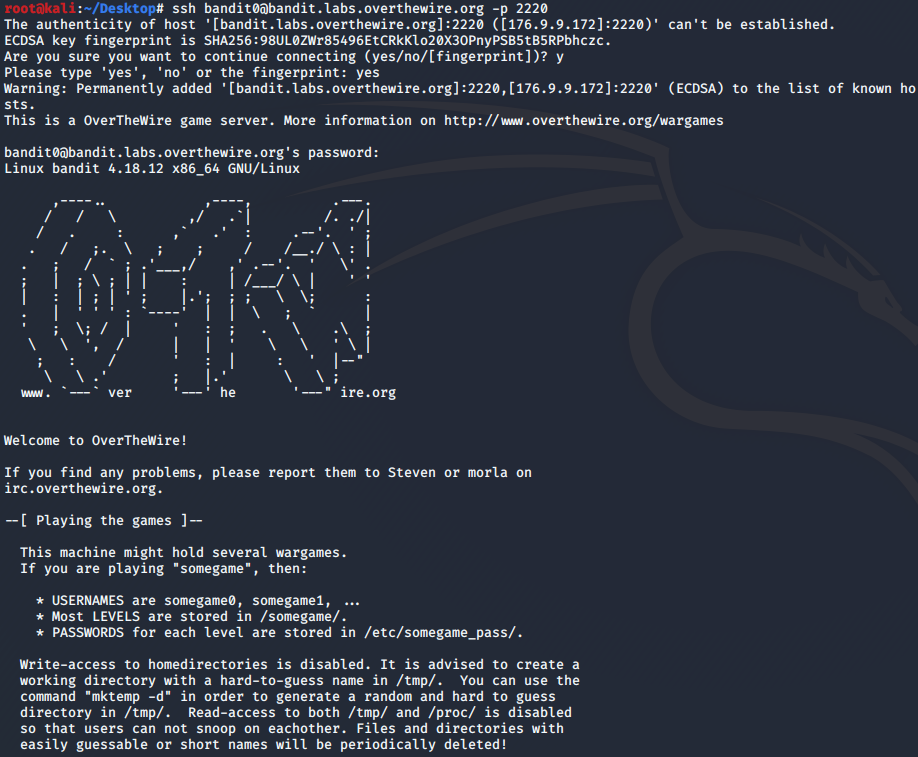
The goal of this level is for you to log into the game using SSH. The host to which you need to connect is bandit.labs.overthewire.org, on port 2220. The username is bandit0 and the password is bandit0. Once logged in, go to the Level 1 page to find out how to beat Level 1. Commands you may need to solve this level:
ssh
The point of this exercise is familiarizing oneself with Secure Shell (SSH). SSH is a cryptographic network protocol for operating network services securely over an unsecured network (common for common-line applications). SSH provides a secure channel over an unsecured network in a client-server architecture. ssh connects and logs into the specified destination, which may be specified as either [user@]hostname or a URI of the form ssh://[user@]hostname[:port].
ssh bandit0@bandit.labs.overthewire.org -p 2220
password: bandit0
Bandit Level 0 → Level 1 Level Goal
The password for the next level is stored in a file called readme located in the home directory. Use this password to log into bandit1 using SSH. Whenever you find a password for a level, use SSH (on port 2220) to log into that level and continue the game. Commands you may need to solve this level
ls, cd, cat, file, du, find
This level is meant to provide some rudimentary instruction on how to navigate the basic file structure of a linux OS using the command line. Following our steps in the previous level, we are still connected to bandit.labs.overthewire.org as user “bandit0” on port 2220. This is confirmed by observing our new command line prompt:
bandit0@bandit:~$
We are looking for a readme file, so we begin by using the ls command to list the files and directories at our current level. When we find the readme file, we can review its contents using the cat command:
bandit0@bandit:~$ ls
readme
bandit0@bandit:~$ cat readme
boJ9jbbUNNfktd78OOpsqOltutMc3MY1
This enables us to login to the next tier:
ssh bandit1@bandit.labs.overthewire.org -p 2220
password: boJ9jbbUNNfktd78OOpsqOltutMc3MY1
Bandit Level 1 → Level 2 Level Goal
The password for the next level is stored in a file called - located in the home directory Commands you may need to solve this level
ls, cd, cat, file, du, find
This level is intended to teach about how special characters are interpreted by commands (and how to work around them). In this case, this challenge is almost exactly the same as the last level. However, instead of “readme” the file is named “-”. Using “-” as a filename is a convention that a lot of programs (including cat) use to mean stdin/stdout (standard in / standard out). To get around this, we need to alter the string presented to cat in such a way that it can be read:
bandit0@bandit:~$ cat ./-
CV1DtqXWVFXTvM2F0k09SHz0YwRINYA9
This enables us to login to the next tier:
ssh bandit2@bandit.labs.overthewire.org -p 2220
password: CV1DtqXWVFXTvM2F0k09SHz0YwRINYA9
Bandit Level 2 → Level 3 Level Goal
The password for the next level is stored in a file called spaces in this filename located in the home directory Commands you may need to solve this level
ls, cd, cat, file, du, find
Like the last level, this level is meant to teach how to handle unusual filenames. In this case, the file has spaces (literally, we are looking for “spaces in this filename”). The problem is that the shell is interpreting the spaces differently than we’d like it to (spaces generally separate different aspects of a command, such as flags/options); we can get around this several ways, including through the use of escape backslashes:
bandit2@bandit:~$ cat spaces\ in\ this\ filename
UmHadQclWmgdLOKQ3YNgjWxGoRMb5luK
This enables us to login to the next tier:
ssh bandit3@bandit.labs.overthewire.org -p 2220
password: UmHadQclWmgdLOKQ3YNgjWxGoRMb5luK
Bandit Level 3 → Level 4 Level Goal
The password for the next level is stored in a hidden file in the inhere directory. Commands you may need to solve this level
ls, cd, cat, file, du, find
The point of this exercise is to learn about hidden files and directories. In Unix OS, any file/folder that starts with a dot character (.example) is treated as hidden - that is, the ls command does not display them unless the -a flag is used:
bandit3@bandit:~$ ls -a
.  ..  .bash_logout  .bashrc  inhere  .profile
bandit3@bandit:~$ cd inhere/
bandit3@bandit:~/inhere$ ls -a
.  ..  .hidden
bandit3@bandit:~/inhere$ cat .hidden
pIwrPrtPN36QITSp3EQaw936yaFoFgAB
This enables us to login to the next tier:
ssh bandit4@bandit.labs.overthewire.org -p 2220
password: pIwrPrtPN36QITSp3EQaw936yaFoFgAB
Bandit Level 4 → Level 5 Level Goal
The password for the next level is stored in the only human-readable file in the inhere directory. Tip: if your terminal is messed up, try the “reset” command. Commands you may need to solve this level
ls, cd, cat, file, du, find
We’re beginning to learn about how to search/filter files. In this instance, we are presented a series of files and must find the only file that is ‘human-readable’. Here’s an example of one that is NOT:
bandit4@bandit:~$ ls
inhere
bandit4@bandit:~$ cd inhere
bandit4@bandit:~/inhere$ ls
-file00  -file01  -file02  -file03  -file04  -file05  -file06  -file07  -file08  -file09
bandit4@bandit:~/inhere$ cat ./-file01
���U"7�w���H��ê�Q����(���#���bandit4@bandit:~/inhere$
We can implement a little bit of filtering by using the “file” command with a wildcard character “*“.
bandit4@bandit:~/inhere$ file ./-file*
./-file00: data
./-file01: data
./-file02: data
./-file03: data
./-file04: data
./-file05: data
./-file06: data
./-file07: ASCII text
./-file08: data
./-file09: data
Based on the results from the output, it would appear that -file07 is the only one that has content that has human-readable characters in it; ASCII (American Standard Code for Information Interchange), is a character encoding standard for electronic communication - ASCII codes represent text in computers:
bandit4@bandit:~/inhere$ cat ./-file07
koReBOKuIDDepwhWk7jZC0RTdopnAYKh
This enables us to login to the next tier:
ssh bandit5@bandit.labs.overthewire.org -p 2220
password: koReBOKuIDDepwhWk7jZC0RTdopnAYKh
Bandit Level 5 → Level 6 Level Goal
The password for the next level is stored in a file somewhere under the inhere directory and has all of the following properties:
human-readable 1033 bytes in size not executable
Commands you may need to solve this level
ls, cd, cat, file, du, find
This challenge encourages us to explore some of the options/flags available to the commands that we’ve learned thus far. We begin by getting a lay of the land:
bandit5@bandit:~$ ls
inhere
bandit5@bandit:~$ cd inhere
bandit5@bandit:~/inhere$ ls
maybehere00  maybehere03  maybehere06  maybehere09  maybehere12  maybehere15  maybehere18
maybehere01  maybehere04  maybehere07  maybehere10  maybehere13  maybehere16  maybehere19
maybehere02  maybehere05  maybehere08  maybehere11  maybehere14  maybehere17
From this, we can see that there are a number of sub-directories within the “inhere” directory. We could manually bruteforce the solution by drilling down each of these folders manually and examining the properties of all the files we encounter, but why not have a hand at automation? From our present directory, we can implement a recursive search for our particular file by running the following command:
bandit5@bandit:~/inhere$ find . -type f -readable ! -executable -size 1033c
./maybehere07/.file2
We can then cat the file for our success!
ssh bandit6@bandit.labs.overthewire.org -p 2220
password: DXjZPULLxYr17uwoI01bNLQbtFemEgo7
Bandit Level 6 → Level 7 Level Goal
The password for the next level is stored somewhere on the server and has all of the following properties:
owned by user bandit7
owned by group bandit6 33 bytes in sizeCommands you may need to solve this level
ls, cd, cat, file, du, find, grep
We are going to build upon what we’ve already learned. Only this time, we have to navigate to a point where we can implement the recursive search:
bandit6@bandit:/home$ cd ..
bandit6@bandit:/$ find . -type f -size 33c -user bandit7
This returns a bunch of results, but only one that doesn’t have “Permission denied” attached to it.
bandit6@bandit:/$ cat ./var/lib/dpkg/info/bandit7.password
HKBPTKQnIay4Fw76bEy8PVxKEDQRKTzs
This enables us to login to the next tier:
ssh bandit7@bandit.labs.overthewire.org -p 2220
password: HKBPTKQnIay4Fw76bEy8PVxKEDQRKTzs
Bandit Level 7 → Level 8 Level Goal
The password for the next level is stored in the file data.txt next to the word millionth Commands you may need to solve this level
grep, sort, uniq, strings, base64, tr, tar, gzip, bzip2, xxd
This challenge is meant to teach us how to parse through text files. Namely, to filter results using grep. The grep filter searches a file for a particular pattern of characters and displays all lines that contain that pattern. The pattern that is searched in the file is a regular expression.
First, let’s have a quick look at what the file would look like if we just cat it:
bandit7@bandit:~$ cat data.txt
cerulean's      iZTo9kciGIJBz5mAbzC1SlclPiEtdrPy
theme   Z6JO61PNlFydE5EhqrgN4eSL7gSQXNXw
Micheal's       LM1wJHAMOX7vUVZX91ViaVC5TNSa4sKs
accept  QpXc9NbK6mmw6DWekjeShioykVPC3Cad
discontinuation KOzmp2mbSjnQ6OxCMto1hWKzDdRTTAlj
facetted        SsOxXGuBJwAebx6xPcNrbNvWOoGTtdGO
grandeur's      8S1k3OF3BTKXk9muMTh0ugpjCmxK9pkl
parqueting      gt6GGOW1HfqNajegwhs9xCUWMkRbPFRp
kith    NsYfr2bWCWC5Yu7mntrDb2JogWKZVmWe
deign   Ke5suAG2FZ3HG72wBQYsdSHIFpzMPj5a
defect  vgrH92uSqFO9oH1SWhrCZnxMjaHoBz5K
excision's      F8wJ3rysjz6zh6H0mrCScCP0478R4r2M
lowness's       2DxJwJJK2FAgDTLgpB7yyn4GiPLTR3fm
ways    nLfJO9PvtYTZJNZv4cxUNLruWHm3BvA6
sayings lz6QNHB7syTsq4ni2TvKT8OdUz1v5s7m
democratization Nb9XrHJ4RSVKdgX4vtqxEl0zhhj7wG74
Kitakyushu's    x36544HFFQ8JQ8BgnS4zoOLZiZ4Cn45X
ailment l1cDSpy6KwUSDPngXvWXFV9hXlpdg8uV
sledged RJk4bWDicHtgw4xX3D5X9UHuNonrlmkI
marketability   tqdGC6jOLMMZ2QCJ6VUXiguKIWg0nAPb
objects LQ2S0utZHfuY1VQvGYZUVQZzT0BtfO5A
wheeze  haSIZDVgintA4XBYL6kCspIBDakYjSQe
infallibility's wGbb6WWAAFSimXUt19AchlewOGSuxLdv
lummoxes        0dOgpx7OhFHxPiijMbxJjpVRfz9cTBRN
definitive      ByR5OoMspJ69BeGQNWF1yS6HEWa3qIHD
nineteenths     xGvmDJthPprblAI4UZZWRkdDjzrKB3lC
memorandums     oGFDZbx7JJl6FUtPqitkaZt72AzlSFQ1
...
The file’s contents continue on for quite a while, so we can see that it could take us quite a while to find the keyword “millionth”. Let’s try this again with grep!
bandit7@bandit:~$ cat data.txt | grep millionth
millionth       cvX2JJa4CFALtqS87jk27qwqGhBM9plV
This enables us to login to the next tier:
ssh bandit8@bandit.labs.overthewire.org -p 2220
password: cvX2JJa4CFALtqS87jk27qwqGhBM9plV
Bandit Level 8 → Level 9 Level Goal
The password for the next level is stored in the file data.txt and is the only line of text that occurs only once Commands you may need to solve this level
grep, sort, uniq, strings, base64, tr, tar, gzip, bzip2, xxd
This exercise is meant to help us find unique results. We are given a text file “data.txt” that contains many different strings that could be our next password. The problem is that we need to find the one (and only one) string that does not reoccur in the file. We can run the following command:
bandit8@bandit:~$ sort ./data.txt | uniq -ic
We can see the number of times each string appears in the file, with most occuring 10 times. There is only 1 result that doesn’t:
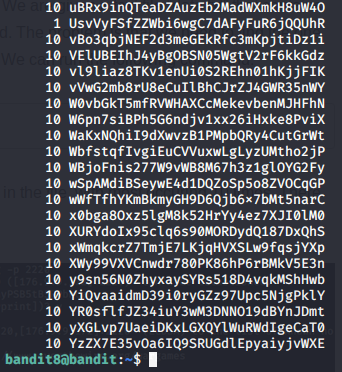
ssh bandit9@bandit.labs.overthewire.org -p 2220
password: UsvVyFSfZZWbi6wgC7dAFyFuR6jQQUhR
Bandit Level 9 → Level 10
Level Goal
The password for the next level is stored in the file data.txt in one of the few human-readable strings, beginning with several ‘=’ characters. Commands you may need to solve this level:
grep, sort, uniq, strings, base64, tr, tar, gzip, bzip2, xxd
Here is another text filter challenge. Because this is a binary file, running cat on it produces so-so results. Instead, we’ll try strings.
bandit9@bandit:~$ strings data.txt | grep ==
2========== the
========== password
========== isa
========== truKLdjsbJ5g7yyJ2X2R0o3a5HQJFuLk
This enables us to login to the next tier:
ssh bandit10@bandit.labs.overthewire.org -p 2220
password: truKLdjsbJ5g7yyJ2X2R0o3a5HQJFuLk